Hedgeblog

Hedgeblog

The ramblings of illustrator and game developer Hedgefield

  • HOME
  • ARCHIVES
    • Illustration
    • Game development
    • Animation
    • Writing
    • Photography
    • Inspiration
    • Freelance diary
    • Daily comics
    • Other
  • PORTFOLIO
  • ABOUT
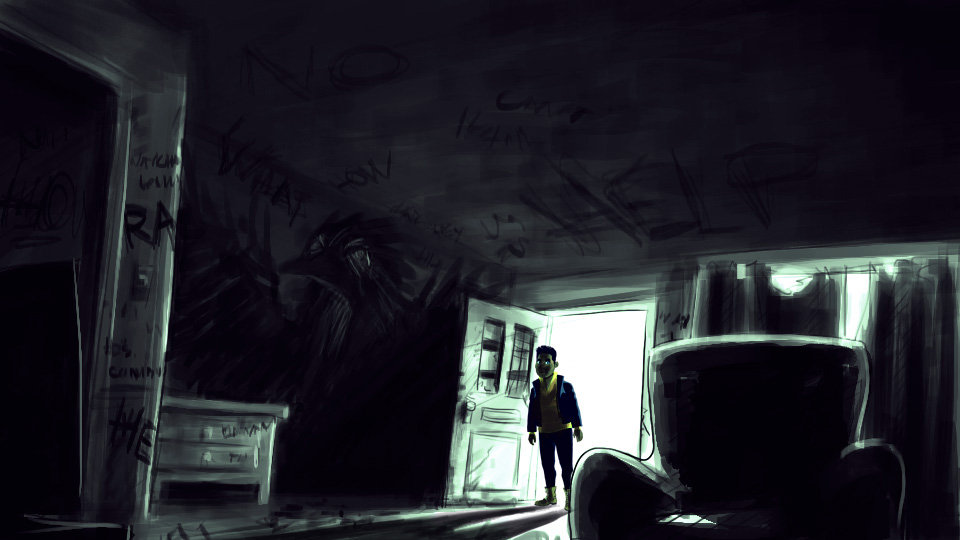
  • Released: The House on Holland Hill

    Released: The House on Holland Hill

    After two weeks of intermittent development, I finished my gamejam game (late) last sunday! I’ve polished up a few bits since then, and aside from the save system that doesn’t work yet, it’s become a pretty solid offering. And more tweaks and polish are probably coming in the next few weeks.

    You can download the game from https://hedgefield.itch.io/hollandhill. Let me know what you thought of it if you play it!

    Share this:

    • Share on X (Opens in new window) X
    • Share on Facebook (Opens in new window) Facebook
    • Share on Pocket (Opens in new window) Pocket
    • Share on Tumblr (Opens in new window) Tumblr
    • Share on Pinterest (Opens in new window) Pinterest
    • Share on Reddit (Opens in new window) Reddit
    December 7, 2016
  • Live from the Wizard Jam front, episode #2

    Hey there! This is my second missive from the WJ4 front – read the first one here.

    I spent last weekend finalizing the geometry so I could turn it into a prefab and use it across all scenes. It mostly came down to adding some final furniture and building out the surrounding terrain and forest. About halfway through, I realized I was putting way too much effort into it, and it served its purpose just fine the way it was. So I packaged it all up and finally started the first story scene.

    screenshot_13

    Unfortunately, it turned out that Adventure Creator was not 100% foolproof in turning everything into a prefab. The common interactions (opening and closing all the doors in the house etc) were especially dire; they turned up blank after being imported into a new scene, so I had to go into each of the associated objects in a new scene and hook them back up. Not great. Lost a lot of time troubleshooting that. But in the end I had a basic scene that I could duplicate, a sort of prefab if you will, so at least I could now set it and forget it.

    Mid-week I finally had some time to dedicate to the game again and I set up the first scene’s logic, which went pretty quickly. That offered some hope for the remaining days. I got started on character sprites too. I wanted to try a more detailed style with thinner lines, like Californium, but in the interest of time I went with my go-to art style. I’ll fix that in post, as they say.

    stairsapproach

    Once I got them in the game and had a few expressions to play with, things really started to come together. I also made a menu that displays which delivery you are embarking on, like the splash screen for the days in Firewatch. Then it was just a matter of knocking out more scenes and more character sprites. Which I did on friday.

    screenshot_16

    I skipped after-hour drinks at the office to get into THE ZONE, and by midnight I had set up about half of the game. Granted, those scenes were the easiest to make and contain very little pithy gameplay, but it was nice to be able to punch those out real quick. I might still make the sunday night deadline with something half decent! It doesn’t help that there are a national holiday and a concert in-between me and that moment though, but oh well…


    Share this:

    • Share on X (Opens in new window) X
    • Share on Facebook (Opens in new window) Facebook
    • Share on Pocket (Opens in new window) Pocket
    • Share on Tumblr (Opens in new window) Tumblr
    • Share on Pinterest (Opens in new window) Pinterest
    • Share on Reddit (Opens in new window) Reddit
    December 3, 2016
  • Live from the Wizard Jam front, episode #1

    Hey there dear reader!

    The last time I did a live devlog was when I was making 15 Minutes, my 24 parody game. And that was back in 2011! I’ve moved on to Unity since then and made a bunch of games, but I don’t often participate in jams. The last time was ol’ Wizard Jam 1, the Idle Thumbs community game jam. But this time around the planets and stars aligned and I had enough time and a good idea, so I’m participating in Wizard Jam 4.

    I got a bit of a late start as I was at a conference on the island of Texel last weekend, but I managed to catch up in the free moments throughout the week.

    The concept

    A few weeks ago I had a dream. In it -among other things- I biked to a villa in the forest and met the man of the house and his maid. I don’t know why, but when I woke up that image stuck with me. I wanted to go to that place and look around more. So, in keeping with me basing games on dreams, I thought it would be a nice thing to make for this jam.

    The groundwork

    I wrote out some details about the game and its events in the past week, so I had enough to jump right into Unity. I decided to use my trusty Adventure Creator plugin, and since I’m not very good with 3D modeling I’m going for a 3D world/2D characters style like The Tell-Tale Heart / Californium / Trackless.

    The player character will be a pizza delivery guy, so the first thing I wanted to get was a little scooter, and I found the perfect one on the Asset Store. And together with a first-person character I was testing last week I had the basics of the first scene. Next was greyboxing the essential geometry. I used assets from the Stylized Jungle Pack I purchased for Reconquista in combination with just regular grey cubes.

    screenshot_3

    Then I started looking for forest villa reference photos.

    screenshot_6

    This gave me the idea to add a driveway and carport around the side of the house – a nice hidden area you’ll only stumble upon if you go snooping around. And of course, a carport isn’t complete without a car. Then I got a little carried away… but hey at least this confirms the interaction system works!

    screenshot_5

    I fiddled with the camera some more after that. It was really jittery, so I imported the First Person Drifter Controller, a neat little plugin I keep around for prototyping these kinds of games, and pulled the mouse smoothing script out of it to integrate with my player prefab. The result is really smooth!

    Next was setting up the interaction system and UI, and I hollowed out the cube I had used to represent the house. I built some rooms and a glass facade, and then I really needed furniture. While browsing the Unity Asset Store I found some really great assets by OneSquareFoot. Their furniture mega pack was perfect to furnish the house with. And a nice opportunity to re-enact the Matrix.

    I tried a few interior layouts and eventually settled on something that felt logical and looked good. Then I moved the sun a few degrees so that it would shine on the terrace for a longer period of time each day, justifying the reason the house was built at this angle. Would that I had such powers in real life.

    screenshot_8

    I was getting antsy to try the character style so I added a quick 2D guy. I should really work on the gameplay a bit at this point, but I wanted to have the house ready so I can turn it into a prefab and use it across all scenes without cutting into my own fingers later. So I spent some time adding collision to the interior, interactive doors, a staircase into the cellar, curtains, outside lights that react to motion and a functional doorbell that summons the man of the house. Just a bit more sprucing up and it should be ready to go.

    screenshot_10

    Share this:

    • Share on X (Opens in new window) X
    • Share on Facebook (Opens in new window) Facebook
    • Share on Pocket (Opens in new window) Pocket
    • Share on Tumblr (Opens in new window) Tumblr
    • Share on Pinterest (Opens in new window) Pinterest
    • Share on Reddit (Opens in new window) Reddit
    November 26, 2016
  • Reconquista 2.0 – revising a released game

    When you’re making games on your own, finishing a project is already a pretty big milestone. But chances are you had to cut some corners to get it done. There are usually a few features that fall by the wayside depending on time, energy, or technical complexity. But how do you decide to either write off those ideas or keep them stored away for a potential version 2.0?

    Since Reconquista was my first 3D game, I had to cut a lot of corners, so when I finished v1.0 I did not feel fulfilled. There wasn’t much to do outside of make a beeline for the temple, and the enemy AI was pretty rudimentary – it didn’t really reward exploration or experimentation. So when I released the game, I knew that I would someday revisit the game design. And I did.

    comparison

    I came back for three reasons; I wanted to:

    (more…)

    Share this:

    • Share on X (Opens in new window) X
    • Share on Facebook (Opens in new window) Facebook
    • Share on Pocket (Opens in new window) Pocket
    • Share on Tumblr (Opens in new window) Tumblr
    • Share on Pinterest (Opens in new window) Pinterest
    • Share on Reddit (Opens in new window) Reddit
    August 19, 2016
  • By the numbers

    stats

    The demo for Last Voyage of the Orlova has been running for two weeks in a corner of VondelCS, and in that time Unity Analytics has been quietly tracking some key events in the game. Here’s a quick breakdown of those numbers:

    It’s hard to say exactly how many people played the game, but I know 107 made it through the first few minutes and fired up the lighthouse.

    77 hopefuls then entered the derelict ship floating through the mist.

    41 of them figured out how to open the engineering deck and end the lockdown.

    35 then made it to the front deck and found the axe.

    They swung that axe 708 times, altogether. Wowzers.

    And finally, 23 hardcore problem-solvers made it to the end of the demo.

    These numbers are pretty impressive considering it’s running on an unattended fully-functional windows machine in some cafe hallway, away from any kind of gaming expo context, and without any strong tutorial content. It also shows that I could do some stronger foreshadowing in certain areas, but it might as well be that people had to move on or weren’t invested enough to explore further.

    All in all, I’m glad I added the analytics in last-minute.

    Share this:

    • Share on X (Opens in new window) X
    • Share on Facebook (Opens in new window) Facebook
    • Share on Pocket (Opens in new window) Pocket
    • Share on Tumblr (Opens in new window) Tumblr
    • Share on Pinterest (Opens in new window) Pinterest
    • Share on Reddit (Opens in new window) Reddit
    July 25, 2016
  • Firewatch Dutch translation

    Firewatch Dutch translation

    TL;DR: Download link.

    As a little passion project I’ve been translating the game Firewatch into dutch in the off hours of the past two months or so. It was a bit more work than I anticipated but I had a good motivator: my girlfriend. I wanted to play the game with her but I knew she wouldn’t fully understand it if it was in english. Plus I like translating things, and this would be a good addition to my ‘portfolio’.

    I had previously translated Gone Home, but Firewatch was a whopping 6827 strings, topping out at 53220 words. Transifex made it very easy with an excellent online editor though. Part of it had already been translated by other people but, nothing against them, it lacked a consistent tone, and some bits were just translated incorrectly. So I went through and reviewed everything, tested it in a full playthrough last week, and I’m ready to release it out into the wild now. There might still be some small errors or typos, so if you find those: let me know. And otherwise: enjoy!

    Share this:

    • Share on X (Opens in new window) X
    • Share on Facebook (Opens in new window) Facebook
    • Share on Pocket (Opens in new window) Pocket
    • Share on Tumblr (Opens in new window) Tumblr
    • Share on Pinterest (Opens in new window) Pinterest
    • Share on Reddit (Opens in new window) Reddit
    July 11, 2016
  • How to do datamoshing in Photoshop

    Datamoshing is “the practice of intentionally using compression artifacts in digital video and animated GIFs to create glitch art”.

    It’s an effect popularized by Kanye West in his video Welcome To Heartbreak, but it’s mostly been an effect exclusive to video. There are a few crazy ways to get this effect on images by editing them with text or audio editors instead of image editors, but it’s hard to find a straightforward way to just do it in Photoshop. But, there is a fairly simple way to emulate it with a few filters. Here’s how:

    (more…)

    Share this:

    • Share on X (Opens in new window) X
    • Share on Facebook (Opens in new window) Facebook
    • Share on Pocket (Opens in new window) Pocket
    • Share on Tumblr (Opens in new window) Tumblr
    • Share on Pinterest (Opens in new window) Pinterest
    • Share on Reddit (Opens in new window) Reddit
    July 6, 2016
  • 5 simple tips for demoing games at events

    2014-09-26 14.18.01

    As I’m getting ready to demo Last Voyage Of The Orlova at the Opium Torenkamer Festival, I’m adding some extra features to the game to make my life easier during the two weeks it will be there. Demoing a game at an event may seem like a simple errand: put the executable on a computer and let people go wild. But there are a few things you can do to make everything go smoothly:

    (more…)

    Share this:

    • Share on X (Opens in new window) X
    • Share on Facebook (Opens in new window) Facebook
    • Share on Pocket (Opens in new window) Pocket
    • Share on Tumblr (Opens in new window) Tumblr
    • Share on Pinterest (Opens in new window) Pinterest
    • Share on Reddit (Opens in new window) Reddit
    July 4, 2016
  • Scratching that itch

    Hey there blog denizens!

    It’s no secret that I’m a fan of itch.io, thé online marketplace for interesting indie games these days, but I never added ALL of my projects before. And it would have been weird to upload unfinished games to a webstore, but itch has evolved tremendously lately, offering support for limited betas and early access games. So now you can find all of my personal projects of note at hedgefield.itch.io.

    But wait, there’s one more thing.

    Last year I stopped blogging weekly about my indie escapades and created a once-in-a-while newsletter, but I noticed that I then also shared less little gamedev insights, something which the blog was perfect for. So I’m bringing that back. As I wrap up work on the first Orlova beta for an upcoming event, expect more work-in-progress posts. It’s time to turn this place back into a proper devblog.

    Starting with the new title screen for Last Voyage of the Orlova.

    OS0.png

    Share this:

    • Share on X (Opens in new window) X
    • Share on Facebook (Opens in new window) Facebook
    • Share on Pocket (Opens in new window) Pocket
    • Share on Tumblr (Opens in new window) Tumblr
    • Share on Pinterest (Opens in new window) Pinterest
    • Share on Reddit (Opens in new window) Reddit
    June 20, 2016
  • A little more conversation,

    My friend Alper is working on an ebook about Conversational bots and UI, something we worked on together at Hubbub too. It seemed only fitting that I drew the cover for his book. So I did. You can preorder it here.

    smaller_20cover.jpeg

    Share this:

    • Share on X (Opens in new window) X
    • Share on Facebook (Opens in new window) Facebook
    • Share on Pocket (Opens in new window) Pocket
    • Share on Tumblr (Opens in new window) Tumblr
    • Share on Pinterest (Opens in new window) Pinterest
    • Share on Reddit (Opens in new window) Reddit
    June 20, 2016
  • Idle hands

    I want to practice more and do more anatomy and gesture drawings, but this one here was a quick exercise in hands. Particularly the perspective when facing the palm with the fingers bending in is hard to do.

    hands.png

    Share this:

    • Share on X (Opens in new window) X
    • Share on Facebook (Opens in new window) Facebook
    • Share on Pocket (Opens in new window) Pocket
    • Share on Tumblr (Opens in new window) Tumblr
    • Share on Pinterest (Opens in new window) Pinterest
    • Share on Reddit (Opens in new window) Reddit
    April 30, 2016
  • My workflow – exporting multiple images

    I thought it might be fun to share some tips and insights about my workflow on here, so here is the first post about that.

    I’ve been working with Photoshop for years and years, and I’ve picked up some cool tricks along the way. But Photoshop itself keeps changing too, so today’s tip is cutting-edge, using the latest features in CC 2015.1 to export images in multiple sizes with one click. This uses two great new features, namely Artboards and The Generator.

    Artboards are old news for users of Illustrator, but in Photoshop they can really enhance your workflow too. I wasn’t a big fan at first, but using it in conjunction with the Generator makes a strong case in their favor.

    The Generator is probably a feature not many people know about. Exporting multiple layers in the past was mostly the domain of Export > Layers To Files, or using Slices in Save For Web, but The Generator is the next evolution; all you have to do is turn on Image Assets under File > Generate, then append .png to the names of the layers you want to export, and when you save your PSD, it automatically crops and exports these layers.

    I found this extremely useful for exporting character limbs for game development, but it has its uses in webdevelopment also. I’ll show you how I use it at my job to export different sizes of the same illustration:

    Screencap_generator

    The source file is very high resolution, obviously, and when it’s done, I have to export into two 1200×628 pngs – one with a text banner for Facebook, and one clean one for the blogpost itself – plus a cropped 700×628 version for Pinterest and Instagram.

    Resizing and cropping manually is a small pain, but a pain nonetheless, especially when you have to go back and change something later.

    So, what I do is make an artboard at the size of the original illustration and convert all the layers in it to a smart object. Then I make three extra artboards at the size I want the exported images to be, copy the smart object into them, and add .png to the artboard names. This way, whenever I make a change in the original illustration, the change is propagated to all the other art boards, and when I hit Ctrl+S it automatically saves them out to separate pngs, ready to go onto the site (well, after they go through ImageOptim).

    Using this setup as a template whenever I start a new illustration saves me a bunch of time otherwise spent exporting images by hand. Hopefully this is useful to some of you too.

    Share this:

    • Share on X (Opens in new window) X
    • Share on Facebook (Opens in new window) Facebook
    • Share on Pocket (Opens in new window) Pocket
    • Share on Tumblr (Opens in new window) Tumblr
    • Share on Pinterest (Opens in new window) Pinterest
    • Share on Reddit (Opens in new window) Reddit
    February 16, 2016
←Previous Page
1 … 4 5 6 7 8 … 26
Next Page→

© Tim Hengeveld. All rights reserved.

Yep, it's another one of those cookie banners.
I don't like 'em either but THE LAW requires me to let you know that cookies are a thing. Read more here:. Cookie settingsACCEPT
Privacy & Cookies Policy

Privacy Overview

This website uses cookies to improve your experience while you navigate through the website. Out of these cookies, the cookies that are categorized as necessary are stored on your browser as they are essential for the working of basic functionalities of the website. We also use third-party cookies that help us analyze and understand how you use this website. These cookies will be stored in your browser only with your consent. You also have the option to opt-out of these cookies. But opting out of some of these cookies may have an effect on your browsing experience.
Necessary
Always Enabled
Necessary cookies are absolutely essential for the website to function properly. This category only includes cookies that ensures basic functionalities and security features of the website. These cookies do not store any personal information.
Non-necessary
Any cookies that may not be particularly necessary for the website to function and is used specifically to collect user personal data via analytics, ads, other embedded contents are termed as non-necessary cookies. It is mandatory to procure user consent prior to running these cookies on your website.
SAVE & ACCEPT